
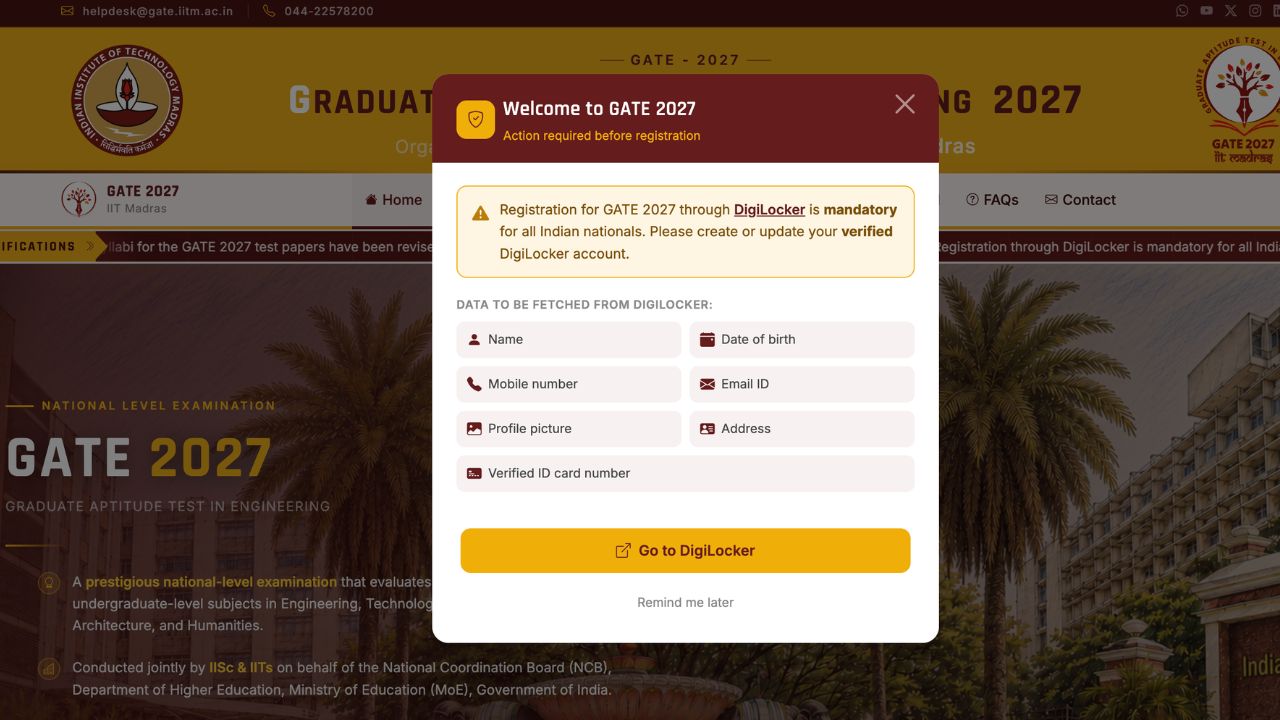
Every year there’s one line in the GATE notification that trips people up more than the syllabus ever does, and for GATE 2027 it’s this one: GATE 2027 DigiLocker registration is now mandatory, straight from the official GATE 2027 portal itself. Not optional, not “recommended for faster processing,” mandatory. If your DigiLocker account isn’t created and fully verified before you sit down to fill the GATE 2027 Registration form, you simply won’t be able to complete it.
The good part is that setting this up takes 15 minutes if you do it now, calmly, instead of at 11 PM on the last day with the form half-filled. This guide walks through exactly how DigiLocker plugs into GATE 2027 Registration, what it pulls from your Aadhaar record, and the specific mismatches that have blocked other candidates’ applications in the past, so you don’t repeat them.
GATE 2027 DigiLocker: Mandatory Linking & Verification Guide
Also know: GATE 2027 Preparation Strategy
Why Is GATE 2027 DigiLocker Registration Mandatory?
In previous GATE cycles, you typed your own name, date of birth, and address into the application form, and IIT Madras trusted you to get it right. For GATE 2027, that manual entry is gone. Every Indian national now has to register through a verified DigiLocker account, and GOAPS pulls your identity details straight from there instead of a text box you can edit. That’s the whole idea behind the GATE 2027 DigiLocker mandate: it’s a fraud and error-prevention step, but it also means the form is only as accurate as your DigiLocker record is, so getting that record right matters more this year than it ever has.
What Data GOAPS Pulls From Your DigiLocker Account
Once you link a verified DigiLocker account during GATE 2027 Registration, the portal auto-fetches the following directly from your Aadhaar-linked record instead of letting you type it in:
| Field | Source |
|---|---|
| Full Name | Aadhaar / DigiLocker record |
| Date of Birth | Aadhaar / DigiLocker record |
| Mobile Number | Aadhaar-linked mobile |
| Email ID | DigiLocker profile |
| Address | Aadhaar / DigiLocker record |
| Profile Photo | DigiLocker record, cross-checked with live facial capture |
| Verified ID Number | Aadhaar / DigiLocker |
Documents Required for GATE 2027 DigiLocker Registration (Official List)
Per the official GATE 2027 portal’s required-documents page, GATE 2027 DigiLocker registration auto-populates your Name, DoB, mobile number, email ID, profile picture, address, and verified ID card number. On top of that, you’ll still need to upload the following separately:
- A high-quality photograph and signature, matching the official size and format specifications.
- A scanned copy of a valid Photo ID (bring the original to the exam center).
- Category certificate (SC/ST), if applicable.
- UDID or PwD certificate, if applicable.
- Dyslexia certificate, if applicable.
- Any other supporting annexures your category or circumstances require.
The portal is explicit that every uploaded document must be readable and clear, warning that unreadable uploads “may lead to delays in processing the application and may lead to rejection of candidature.” Scan everything properly the first time; this isn’t a step worth rushing.
How to Create and Verify Your DigiLocker Account
If you’ve never used DigiLocker before, here’s the full setup, start to finish:
- Go to digilocker.gov.in on a browser, or install the DigiLocker app on your phone.
- Tap “Sign Up” and enter your 12-digit Aadhaar number.
- Confirm the OTP sent to your Aadhaar-linked mobile number. If your mobile number isn’t linked to Aadhaar anymore, you’ll need to update it at an Aadhaar Seva Kendra before you can proceed, so check this early.
- Set a 6-digit security PIN for your account.
- Once inside, check your profile section and confirm your name, date of birth, address, and photo are current and match your Photo ID exactly.
- If anything is outdated, update it through DigiLocker or your Aadhaar record and let it sync before you attempt GATE registration, since verification isn’t always instant.
How to Link DigiLocker During GATE 2027 Registration
Once GOAPS is live (registration now opens on 27th August 2026), linking your account during the actual application takes just a few steps:
- Register on GOAPS with a valid email address and mobile number to create your login.
- On the identity verification step, select “Register/Link using DigiLocker.”
- Log in with your DigiLocker credentials when prompted.
- Grant GOAPS permission to fetch your verified details from DigiLocker.
- Complete the live facial capture step using your webcam or phone camera, which gets matched against your DigiLocker photo.
- Review the auto-filled details carefully before submitting. Since you can no longer freely retype this information, catching an error here matters more than it used to.
Common GATE 2027 DigiLocker Errors That Can Block Your Application
This is the part most guides skip past, but it’s the part that actually costs candidates time. Based on how DigiLocker-linked registration has played out for candidates so far, these are the mismatches worth checking for now, not on registration day.
| Issue | What It Means | How to Fix It |
|---|---|---|
| Name mismatch | Your name on the GATE form, DigiLocker, and Photo ID don’t match exactly, including spelling, initials, or titles like Mr./Ms./Dr. | Use your name exactly as it appears on your Photo ID, with no titles. Correct any spelling difference in your Aadhaar record first. |
| Date of birth mismatch | DOB in DigiLocker doesn’t match your Photo ID or academic records. | Update the incorrect record before registration. Don’t wait for GATE’s correction window to fix an Aadhaar-level error. |
| Unverified or outdated DigiLocker account | Account exists but documents aren’t verified, or details haven’t synced with a recent Aadhaar update. | Log in, revisit your profile, and re-issue or refresh documents so DigiLocker shows a verified status. |
| Aadhaar mobile number not active | OTP can’t be delivered because the number linked to Aadhaar is switched off or changed. | Update your mobile number with Aadhaar at a Seva Kendra well before the registration window. |
| Photo mismatch during live capture | Live facial capture doesn’t match the photo on record, often due to an old or low-quality DigiLocker photo. | Update your DigiLocker profile photo to a recent, clear one before you begin the GATE application. |
Any one of these can delay or outright block your registration, and with a hard deadline of 27th September 2026 for regular applications, that’s not a risk worth taking in the final days.
Your Pre-Registration DigiLocker Checklist
- DigiLocker account created and fully verified, not just signed up.
- Name, date of birth, and address identical across DigiLocker, Aadhaar, and your Photo ID.
- Aadhaar-linked mobile number active and able to receive OTPs.
- Recent, clear profile photo updated on DigiLocker.
- Same Photo ID you registered with kept ready to carry to the exam center later.
FAQs on GATE 2027 DigiLocker Registration
Is DigiLocker really mandatory for GATE 2027 Registration?
Yes. GATE 2027 Registration through a verified DigiLocker account is mandatory for all Indian nationals. Without it, the application form cannot be completed.
What details does GOAPS fetch from DigiLocker?
GOAPS auto-fetches your name, date of birth, mobile number, email ID, address, profile photo, and verified ID number directly from your DigiLocker record instead of manual entry.
What happens if my name doesn’t match between DigiLocker and my Photo ID?
A mismatch in name, date of birth, or other details between DigiLocker and your Photo ID can delay or block your GATE 2027 registration. Correct the mismatch in your Aadhaar or DigiLocker record before you begin the application.
How do I create a DigiLocker account for GATE 2027?
Visit digilocker.gov.in or install the DigiLocker app, sign up with your 12-digit Aadhaar number, verify the OTP sent to your Aadhaar-linked mobile, and set a 6-digit security PIN to complete account creation.
Is foreign nationals required to use DigiLocker for GATE 2027?
The DigiLocker mandate applies to Indian nationals. Foreign candidates should check the official GATE 2027 notification for the specific identity verification process that applies to them.